My Homepage config had grown to about 40 hand-written service entries and over 1,000 lines of custom CSS and JS. Every new container meant another YAML block. I’d forget to add it, so the dashboard was wrong a lot of the time, and I’d only find out when I went looking for something that was running but not listed.
I used Homepage for a long time and liked it. That matters for the rest of this post. It does what it says, and the problem was me: I was the only source of truth for what exists in my lab, and I’m a bad one.
Most of what a dashboard needs is already known by something. Proxmox knows which guests exist and what their IPs are. Docker knows what’s published on which port. The apps themselves will tell you who they are if you ask. So I wrote Burrow, and it’s now released under the MIT license.
What it does
You point it at Proxmox and Docker. For Proxmox it uses a read-only token with the PVEAuditor role and nothing else. It lists the nodes, VMs and containers, checks the usual ports on every guest, and works out which app is behind each one. Then each app gets a card with live status and a few numbers: the Sonarr queue, Plex streams, the Pi-hole block rate, qBittorrent speed.
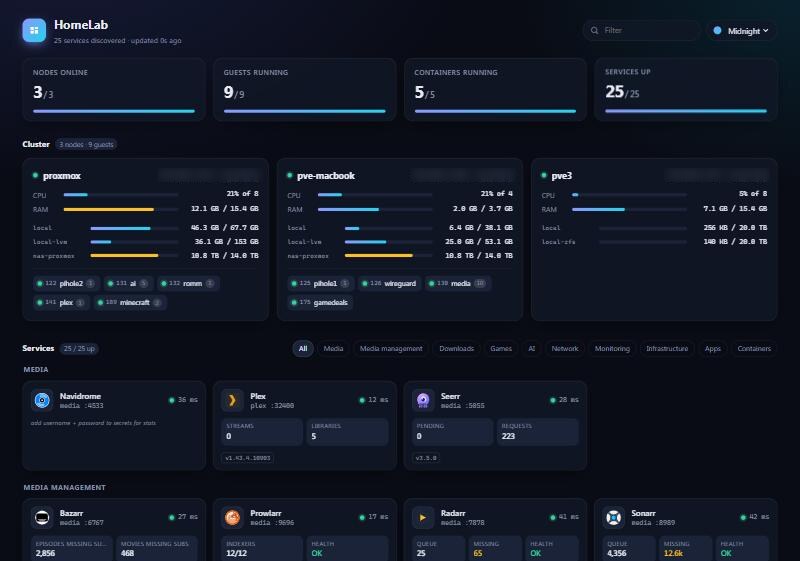
Anything it can’t identify still gets a card with the container name and whether it’s up. I wanted that part to be boring and reliable. A dashboard that silently drops what it doesn’t recognise is the same problem I had before, just automated.
It recognises about 125 apps. 56 of those are verified against real installs, and that number is the part I care about most.
The test lab
I built a throwaway lab of about 55 popular apps on a spare Proxmox node. A script records what each one actually answers, and the test suite replays those recordings. Every app has to be identified from its Docker image, identified from its port alone, and not mistaken for anything else.
The lab caught things I’d never have found by reading my own setup:
- Burrow running directly on a Docker host was probing the router instead of itself.
- qBittorrent 5.x changed its login response, so a login that worked on 4.x quietly failed.
- An overloaded host made slow apps look like unknown containers. Now a container named by its image keeps its identity even if it answers slowly. A Sonarr that’s slow is still Sonarr.
The third one is a design decision as much as a bug fix. When the evidence disagrees, I’d rather trust the image name than a timeout.
Running it for real
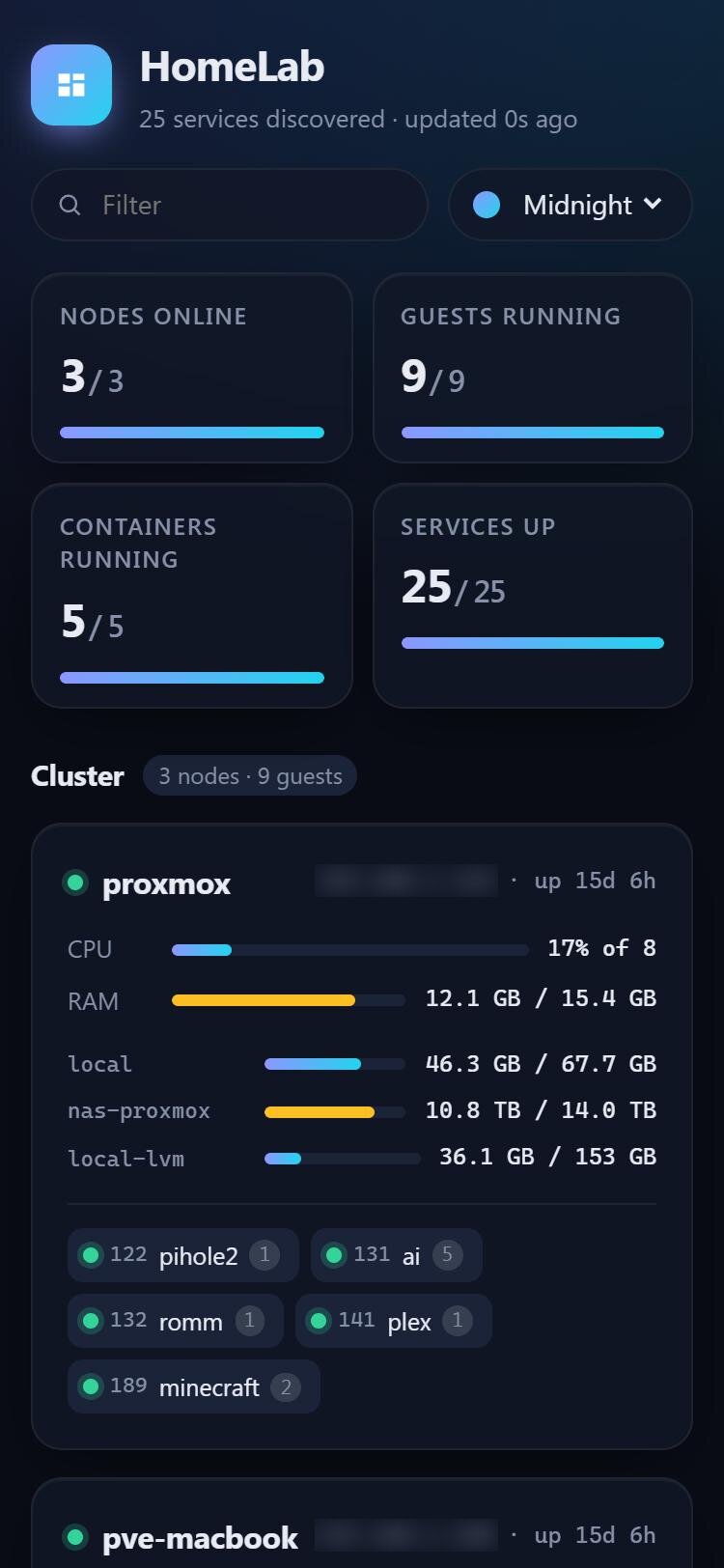
It replaced my actual dashboard: 3 Proxmox nodes, about 10 guests, 40-plus services. I have three views, Home, Infra and Apps, shown as tabs. There’s also a Family view for my fiancée with only the shared stuff: Plex, recipes, games. She bookmarked it and doesn’t see the rest.
If you’re coming from Homepage, there’s an importer that reads its config. I ran it on my own and the result came out very close to what I’d ported by hand. It keeps your names and descriptions, and it moves API keys into a separate secrets file.
The customisation I actually use: colour thresholds on any number (my storage card goes amber and then red as free space drops), choosing and renaming the stats a card shows, sparklines, and pinning or hiding cards per browser. There are four themes plus an auto theme that follows the device. Icons are served by Burrow itself, so they still work with the internet down. Config changes apply without a restart, and if you break the syntax it keeps running on the last good version and tells you.
It’s plain Python with no dependencies, one small container, vanilla JS and no database. It only reads from your lab, and secrets never reach the browser.
What it doesn’t do
It has no login of its own. Put it behind your reverse proxy or keep it on your LAN.
VMs without the QEMU guest agent need their IP set by hand, because Proxmox can’t tell Burrow what it doesn’t know. The richer stats need each app’s API key, since the app has to let Burrow ask. Discovery gets you the card for free, but the numbers cost you a key.
And it’s an early beta. Expect rough edges.
Where I land
Discovery beats hand-written config when your lab changes. If you add containers every few weeks, forget to update a list, or run several hosts, then letting the lab describe itself saves you the one chore that decides whether a dashboard stays accurate. It also wins the first ten minutes: Burrow shows something useful before you’ve written any config at all. With Homepage, Homarr or Dashy you start with a blank page and fill it in.
Hand-written config wins when the lab is small and stable. If you have a dozen services and they haven’t moved in a year, a YAML file you control completely is simpler than a program making guesses. You also get exactly the layout you want, with nothing on the page you didn’t put there. Burrow trades some of that control for not having to maintain a list, and sometimes it will be wrong in a way a list never would be. When it’s wrong you fix it with an override, but you have to notice first.
The other trade-off is maturity. Homepage, Homarr and Dashy have been used by far more people than Burrow has. If you depend on something specific they support, check before you switch.
I switched because my own config was the thing going stale. If yours isn’t, you probably shouldn’t. If it is, the repo has an install guide and a container image at ghcr.io/kylechrisking/burrow.